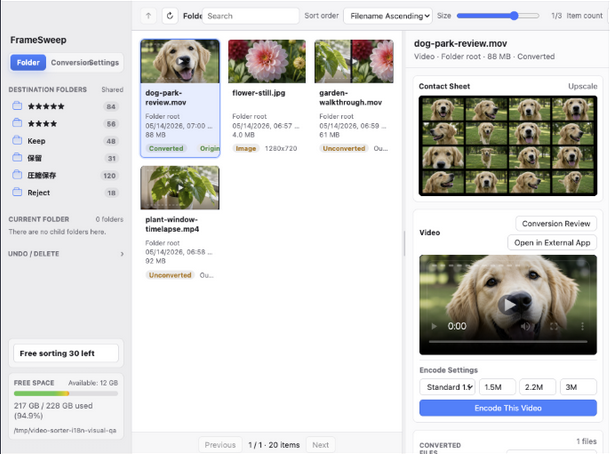
動画ファーストの整理
Video-first sorting
大量のMP4、画面収録、書き出し素材を、サムネイルと再生プレビューで見極めながら実際の行き先へ移動します。
Sort large MP4 collections, screen recordings, and exported clips into real destinations while keeping preview context.
大量の動画・写真を、再生して確認しながら移動・圧縮・片付けできるMacアプリ。
Review large sets of video and photo files before you move, compress, or clean them up.
FrameSweepは、選んだ場所にある動画・写真ファイルをサムネイル一覧と再生プレビューで確認し、必要なファイルを行き先ごとに移動できます。縦型画像のコンタクトシート作成や縦長動画の確認にも使いやすく、容量を減らしたいときはHEVC(H.265)圧縮やJPEG/WebP変換まで続けて進められます。
FrameSweep lets you review video and photo files from a location you choose, then move selected files into the right destinations. It is also built for portrait image contact sheets and vertical video review, with HEVC (H.265), JPEG/WebP conversion, duplicate checks, and output review.
現在は公式情報ページです。Mac App Store公開後は、このページからダウンロードへ案内します。
This is the official product page. A Mac App Store link can be added here when the listing is live.


外付けSSDや素材置き場の動画・写真ファイルを、フォルダ単位で読み込んで整理できます。残すものはカテゴリ別の移動先へ、容量を減らしたいものは圧縮へ、不要なものはゴミ箱へ。いつものファイル管理の延長で使えます。
Load video and photo files by folder, then keep your cleanup close to normal file management. Move keepers into destination folders, compress files when size matters, or send unwanted files to Trash.
選んだ場所にある動画・写真ファイルを読み込みます。ファイルはMac上に残り、アカウントやクラウド同期は不要です。
Load video and photo files from the location you choose. Files stay on your Mac, and no account or cloud sync is required.
サムネイル、再生プレビュー、コンタクトシートを見ながら、必要なファイルを指定した行き先へ移動できます。
Use thumbnails, playback preview, and contact sheets to move the files you need into destination folders.
残したいけれど容量を減らしたい動画はHEVC(H.265)へ。画像はJPEG/WebPへ変換できます。
Compress videos you still want to keep with HEVC (H.265), and re-encode images to JPEG/WebP.
不要と判断したファイルはmacOSのゴミ箱へ移動します。いきなり完全削除せず、戻せる余地を残します。
Move files you no longer need to the macOS Trash after review, without immediate permanent deletion.
FrameSweepは一括削除ツールではありません。中身を見て、必要なら軽くして、最後に片付けるためのレビュー中心のワークフローです。
FrameSweep is not a bulk-delete tool. It is a review-first workflow for seeing what you have, reducing file size when useful, and cleaning up only after that.
大量のMP4、画面収録、書き出し素材を、サムネイルと再生プレビューで見極めながら実際の行き先へ移動します。
Sort large MP4 collections, screen recordings, and exported clips into real destinations while keeping preview context.
MacのVideoToolboxを使って動画をHEVC(H.265)へ圧縮。画像はJPEG/WebPへ再エンコードできます。
Use Apple's VideoToolbox to compress videos to HEVC (H.265). Images can be re-encoded to JPEG/WebP.
同じ名前に近いファイルや見た目が似た候補を確認し、変換後の出力も見直してから整理できます。
Review files with similar names or visual matches, then inspect converted outputs before deciding what to clean up.
縦型画像のコンタクトシート作成や、縦長動画の再生確認に対応。スマホ素材やSNS用動画も、向きに合わせて見やすく管理できます。
Create contact sheets for portrait images and review vertical videos without losing context. It is suited to phone-shot media, social clips, and mixed-orientation folders.
何百本も確認するときは、マウス操作だけだと止まりがちです。よく使う再生、移動、仕分け、取り消しをキー操作で進められます。
When reviewing hundreds of files, keyboard control keeps the flow moving: play, navigate, sort, seek, reject, and undo.
最初は少量のファイルで試すのがおすすめです。移動やゴミ箱操作の前に、プレビューと変換後レビューの流れを確認できます。
Start with a small set of files. You can learn the preview and output-review flow before moving files or using Trash actions on larger batches.
整理したい動画・写真が入っている場所を選びます。FrameSweepは、その場所を基準に一覧とプレビューを作ります。
Pick the location that contains the videos or photos you want to clean up. FrameSweep builds the list and previews from there.
「残す」「あとで見る」「圧縮して保存」など、作業しやすい名前でカテゴリフォルダを用意します。
Create destination folders with names that match your workflow, such as Keep, Review Later, or Compressed Archive.
検索、カードサイズ、重複候補、コンタクトシートを使って、確認するファイルを絞ります。
Use search, card sizing, duplicate candidates, and contact sheets to narrow the files that need attention.
縦型画像はコンタクトシートで流れを見やすく確認。縦長動画も、一覧、再生、移動の流れを崩さず管理できます。
Use contact sheets to inspect portrait images, and keep vertical video review, playback, and moving in the same workflow.
残したいけれど容量を減らしたい動画はHEVCへ。画像はJPEG/WebPへ。バッチ変換前に対象を確認できます。
Compress videos you still want to keep with HEVC, or re-encode images to JPEG/WebP after checking the batch plan.
変換後のファイルを確認し、画質や内容に問題ないものだけ整理に進めます。
Inspect converted files and continue cleanup only when the output quality and content look right.
不要と判断したファイルをmacOSのゴミ箱へ移動します。完全削除はmacOS側で最終確認できます。
Move files you no longer need to the macOS Trash. Permanent deletion remains a separate macOS decision.
初めて使う人が気にしやすい、ファイルの扱い、購入、削除、対応範囲をまとめています。
Answers to the first questions people usually have about files, purchases, deletion, and supported workflows.
いいえ。プレビュー、整理、重複確認、動画変換、画像変換はMac上でローカルに実行されます。FrameSweepはユーザーのメディアファイルを開発者へアップロードしません。
No. Preview, sorting, duplicate review, video conversion, and image conversion run locally on your Mac. FrameSweep does not upload your media files to the developer.
FrameSweep Proは買い切りのApp内課金です。無料版の制限を超えて、仕分け、ゴミ箱移動、動画・画像変換、バッチ変換、変換後レビュー、変換済みファイル整理、見た目が似たファイルの確認を使えます。
FrameSweep Pro is a one-time In-App Purchase. It removes the free limits for sorting, Trash moves, video and image conversion, batch conversion, output review, converted-file cleanup, and visual match analysis.
いいえ。移動やゴミ箱への移動はユーザー操作で実行します。FrameSweepが元ファイルを勝手に完全削除することはありません。
No. Moving files or sending them to Trash is user-driven. FrameSweep does not permanently delete originals on its own.
画像にも対応します。ただし中心は、大量の動画を再生・比較しながら分類し、必要に応じてHEVC(H.265)で容量を減らすワークフローです。
It supports images, but the core workflow is video-first: review and compare large sets of video files, move them into the right destinations, and use HEVC (H.265) compression when useful.
はい。縦型画像はコンタクトシートでまとめて確認でき、縦長動画もサムネイル一覧、再生プレビュー、移動先への仕分けを同じ流れで扱えます。スマホ撮影素材やSNS向け動画の整理にも向いています。
Yes. Portrait images can be reviewed with contact sheets, and vertical videos stay in the same thumbnail, playback, and destination-sorting workflow. It is useful for phone-shot media and social video cleanup.
使い方、ショートカット、FAQ、サポート、プライバシーポリシーをここに集約します。
Usage guide, shortcuts, FAQ, support, and privacy policy live here.